Understanding Your Billing & Subscription
Hey! Let me walk you through how billing works in Axie Studio. I'll explain the different plans, what you get with each, and how to manage your subscription. This stuff can be confusing, so I'll make it simple.
What Plans Are Available?
Axie Studio offers three plans designed to grow with your needs:
- Free: Perfect for trying things out
- Pro: For serious businesses ($29/month)
- Enterprise: For teams and large organizations ($99/month)
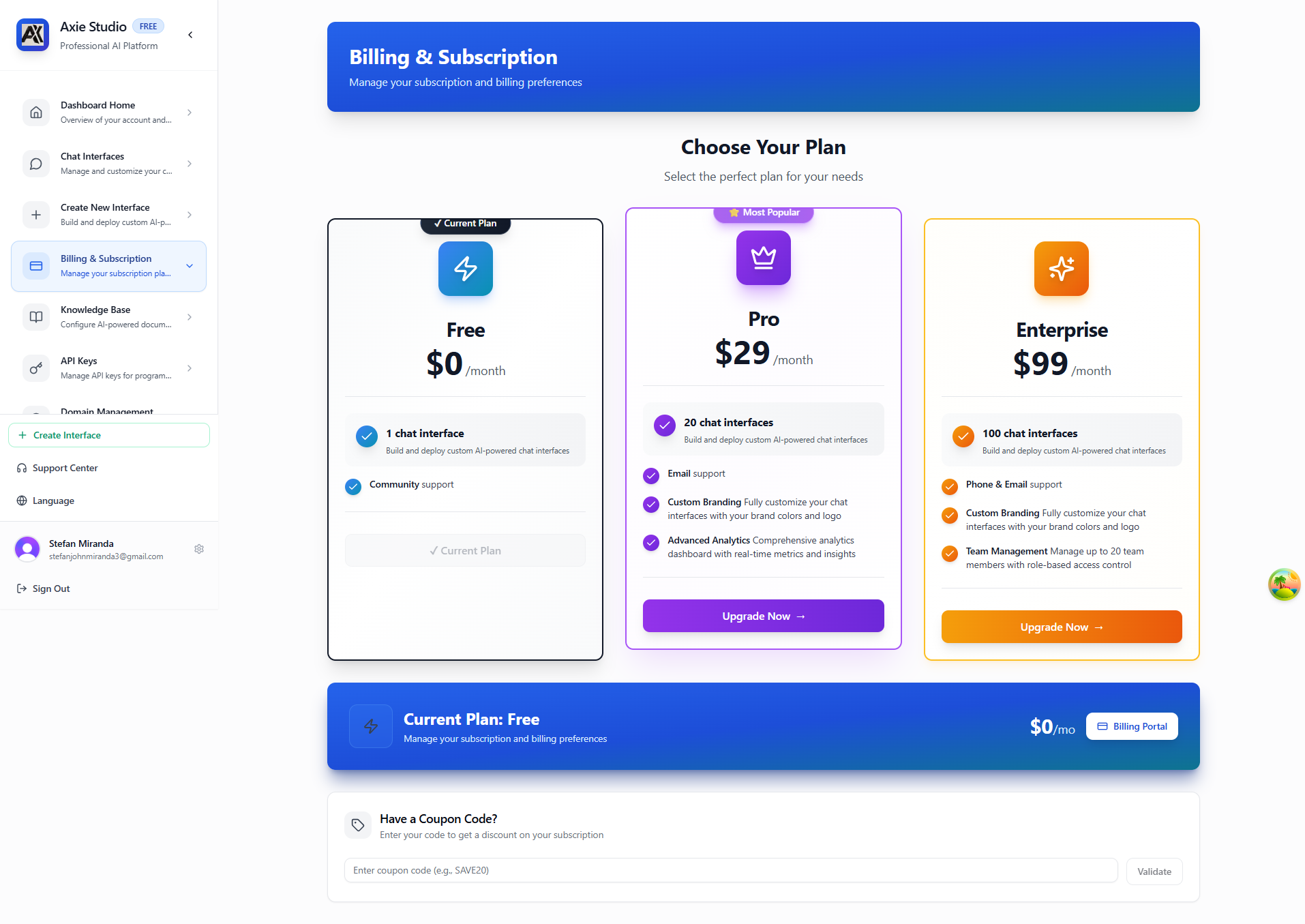
Let me break down exactly what you get with each plan, so you can choose what's right for you.
The Free Plan - Getting Started
What you get:
- 1 chat interface - Perfect for testing or a single project
- Basic features - All core functionality
- Public URLs - Your interfaces are accessible via public URLs
- Community support - Help from the community and documentation
- 500 API requests/hour - Limited API access for testing
Who it's for:
- People just starting out
- Testing the platform before committing
- Small personal projects
- Learning how everything works
The catch:
- Only 1 chat interface (if you need more, you'll need to upgrade)
- Limited API rate limits
- No custom domains
- No advanced analytics
Think of it as a "try before you buy" plan. It's great for getting your feet wet!
The Pro Plan - For Growing Businesses
What you get:
- 20 chat interfaces - Enough for multiple projects or clients
- Custom domains - Use your own domain (e.g., support.yourcompany.com)
- Advanced analytics - Full analytics dashboard access
- Email support - Priority email support (faster responses)
- API access - 1,000 requests per hour
- Custom branding - Full control over chat interface appearance
- All Free features - Everything from the Free plan
Pricing: $29/month
Who it's for:
- Growing businesses with multiple projects
- Agencies managing client interfaces
- Companies that need custom domains
- Anyone who needs more than 1 interface
This is the sweet spot for most businesses. You get everything you need without the complexity of enterprise features.
The Enterprise Plan - For Teams
What you get:
- 100 chat interfaces - Shared across your entire team
- Team management - Add up to 20 team members, assign roles
- User roles & permissions - Control who can do what
- Phone support - Direct phone support when you need it
- 10,000 API requests/hour - High-volume API access
- Advanced security - Enterprise-grade security features
- Custom branding - Full chat interface customization
- Everything in Pro - All Pro features included
- Custom contracts - Available for large teams (contact sales)
Pricing: $99/month
Who it's for:
- Teams working together
- Large organizations
- Companies needing high API limits
- Organizations with security/compliance requirements
Important note: Enterprise billing is managed by the owner only. Team members and admins can't access billing - only the owner can.
Managing Your Subscription
View Your Current Plan
- Go to Dashboard -> Billing & Subscription
- See your current plan at the top
- View your usage and limits
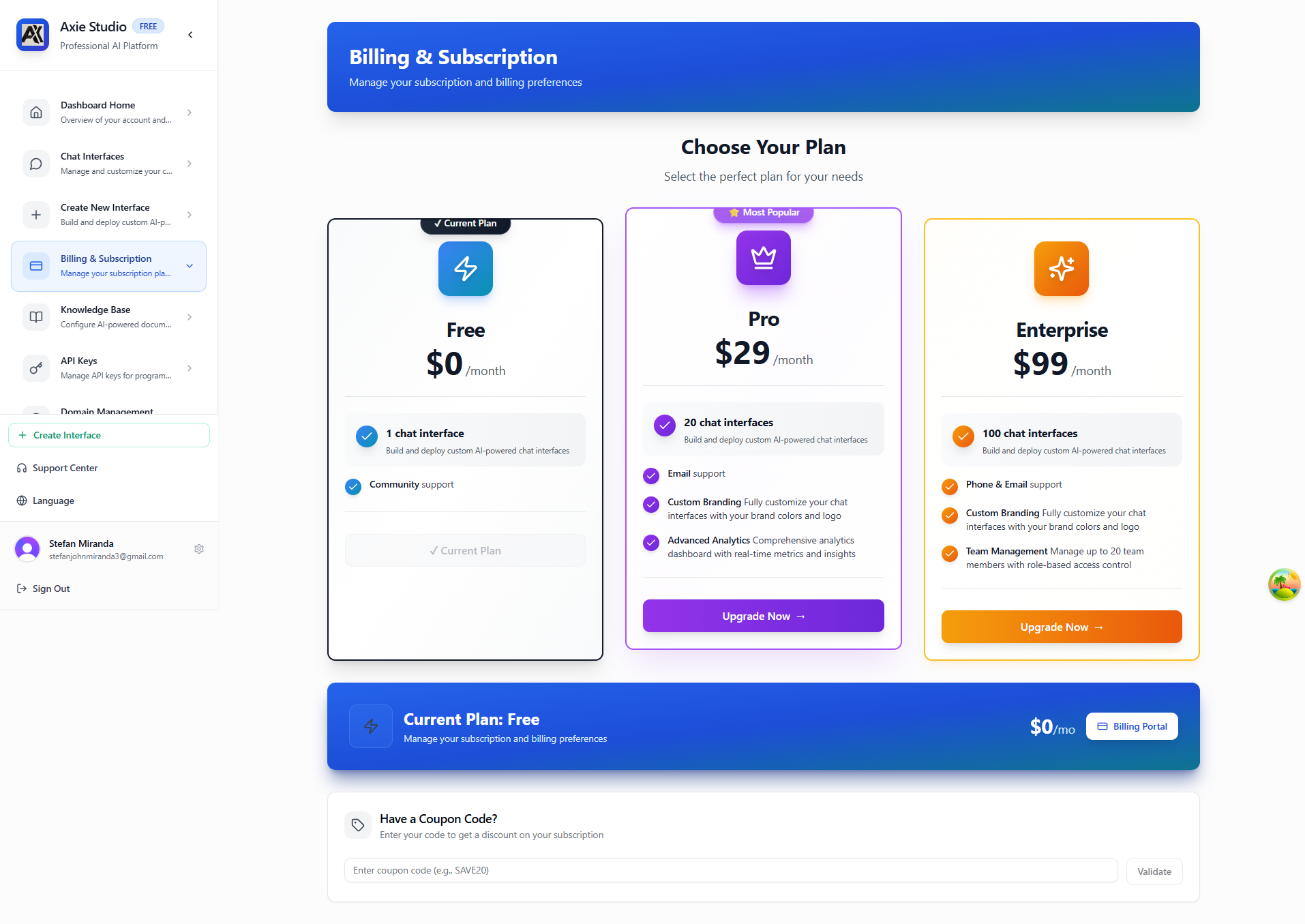
The billing page shows you everything you need to know about your subscription at a glance - your current plan, usage, and available upgrades.
Upgrade Your Plan
- Go to Billing & Subscription
- Click "Upgrade to Pro" or "Upgrade to Enterprise"
- Choose your billing cycle (monthly or annual)
- Complete payment
- Your plan upgrades immediately!
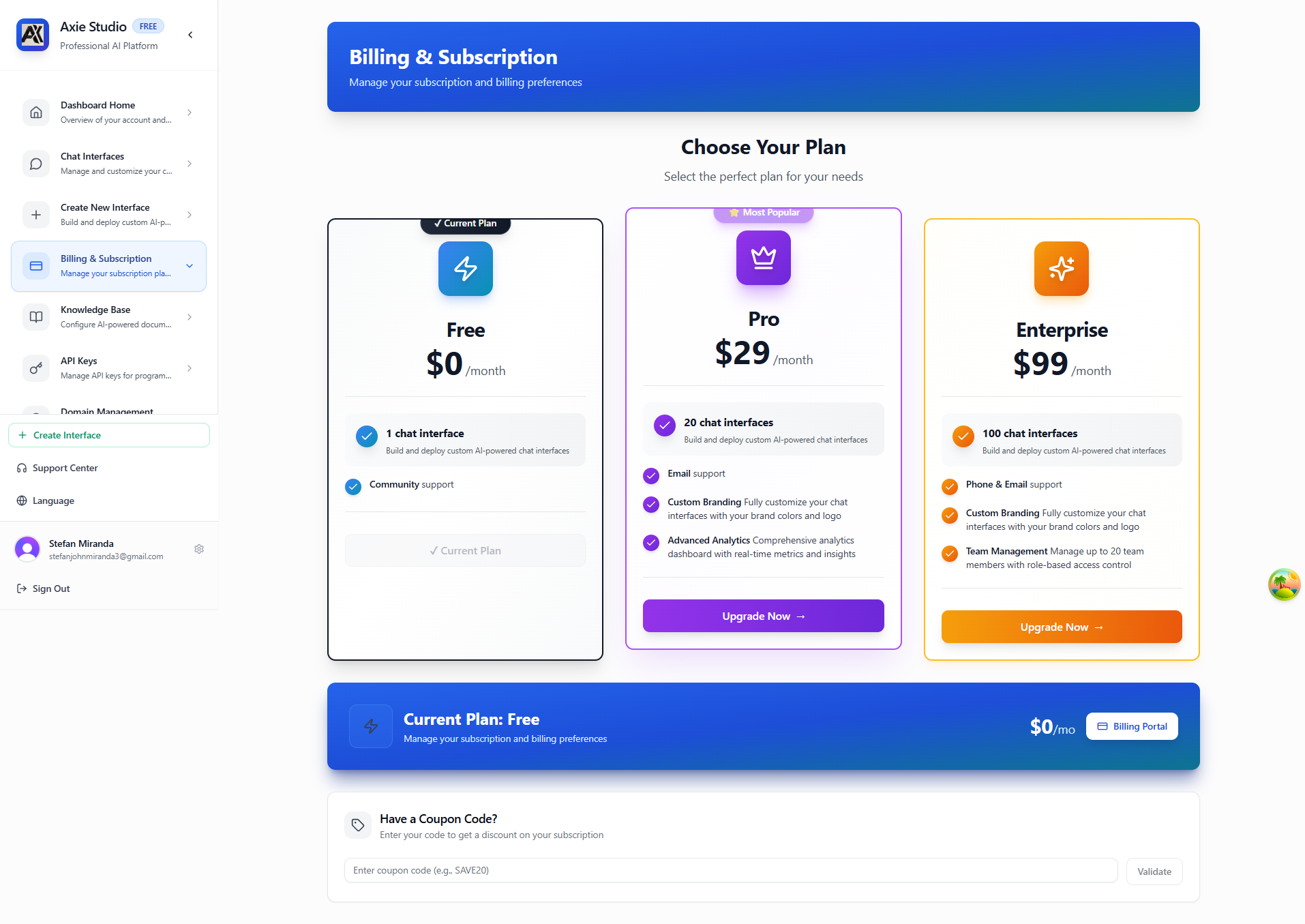
You'll see all available plans with their features and pricing. Simply click the upgrade button for the plan you want.
Downgrade Your Plan
- Go to Billing & Subscription
- Click "Change Plan"
- Select a lower plan
- Confirm the change
- Changes take effect at the end of your billing period
Billing Information
Payment Methods
- Credit Card: Visa, Mastercard, American Express
- Stripe: Secure payment processing (we use Stripe for all payments)
- Automatic Renewal: Enabled by default (you can disable this anytime)
All payments are processed securely through Stripe, so your payment information is never stored on our servers.
Billing Cycle
- Monthly: Billed every month on the same date
- Annual: Billed once per year (save with annual plans)
You can switch between monthly and annual billing anytime from your billing page.
Invoices
- View all invoices in your billing page
- Download PDF invoices for your records
- Email receipts automatically sent after each payment
Your billing page shows your payment history, upcoming invoices, and payment method. Everything you need in one place!
Subscription Limits
Here's a clear breakdown of what each plan includes:
Free Plan Limits
- Chat Interfaces: 1
- Custom Domains: 0
- API Keys: Limited (500 requests/hour)
- Analytics: Basic only
- Support: Community support
Pro Plan Limits
- Chat Interfaces: 20
- Custom Domains: Unlimited
- API Keys: Unlimited (1,000 requests/hour)
- Analytics: Full access
- Support: Priority email support
Enterprise Plan Limits
- Chat Interfaces: 100 (shared across team)
- Custom Domains: Unlimited
- API Keys: Unlimited (10,000 requests/hour)
- Analytics: Full access
- Team Members: Up to 20 team members
- Support: Priority email + Phone support
This visual comparison makes it easy to see which plan fits your needs.
What Happens When You Upgrade?
Immediate Benefits
- Access to new features immediately
- Higher limits activated right away
- Better support access
Existing Data
- All your interfaces remain
- All your settings preserved
- No data loss
Billing
- Prorated charges (if upgrading mid- cycle)
- New billing cycle starts
- Automatic renewal enabled
What Happens When You Downgrade?
At End of Billing Period
- Lower limits apply
- Some features may be disabled
- You may need to remove excess interfaces
Before Downgrading
- Check Your Usage: Make sure you're within new plan limits
- Backup Data: Export any important data
- Remove Excess: Delete interfaces if over limit
- Confirm: Complete the downgrade
Enterprise Billing
Who Can Manage Billing?
Important: Enterprise billing is managed by the owner only.
- Enterprise Owner: Full billing access - can view, upgrade, downgrade, and manage payment methods
- Enterprise Admin: No billing access (redirected to dashboard)
- Enterprise Users: No billing access (redirected to dashboard)
This is by design - only the person who created the enterprise account can manage billing. This prevents confusion and ensures clear ownership.
Enterprise Features
When you're on Enterprise, you get:
- Team Management: Add/remove team members (up to 20)
- User Roles: Assign permissions (owner, admin, user)
- Audit Logs: Track all activity across your team
- Custom Contracts: Available for large teams (contact sales)
The billing page for Enterprise owners looks the same as other plans, but includes team- wide usage statistics.
Payment Issues
Failed Payments
If a payment fails:
- You'll receive an email notification
- Your account may be temporarily limited
- Update your payment method
- Payment will retry automatically
Refunds
- Contact support for refund requests
- Refunds processed within 5- 7 business days
- Prorated refunds for unused time
Common Questions
Can I cancel anytime?
Yes! Cancel your subscription anytime. You'll retain access until the end of your billing period.
What happens to my data if I cancel?
Your data remains for 30 days after cancellation. You can reactivate within this period.
Can I change billing cycles?
Yes! Switch between monthly and annual anytime. Annual plans offer savings.
Do you offer refunds?
Contact support for refund requests. We handle them case- by- case.
Can I get a discount?
- Annual Plans: Save with annual billing
- Enterprise: Custom pricing available
- Contact Sales: For large deployments
Next Steps
Ready to upgrade? Go to Dashboard -> Billing & Subscription!